7. TheorChem2Blender - Animating .xyz input
Overview
TheorChem2Blender is a program that has 5 tabs. Which tabs to modify depend on the type of 3D file the user wants to create. For the simplest use of the program, you only need to specify the input, and convert it as output. The default output format is glb. Below is a continuation on how to use TheorChem2Blender, focused animating .com input. Refer to (3) basic use for information about how to choose com input files to convert, (4) highlighting bonds for how to highlight atoms and bonds, (5) specifying ions for ionic compounds, and (6) animating com files for animating com files.
Input tab
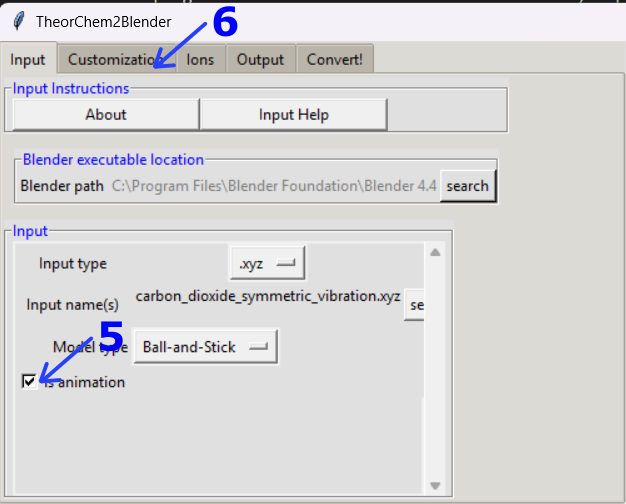
Change the input to .xyz
Click on set to select the input name
Go to inpuut_examples/xyz_files/trajectories/
Select the carbon_dioxide_symmetric_vibration.xyz file
Select is animation
Go to the Customization tab
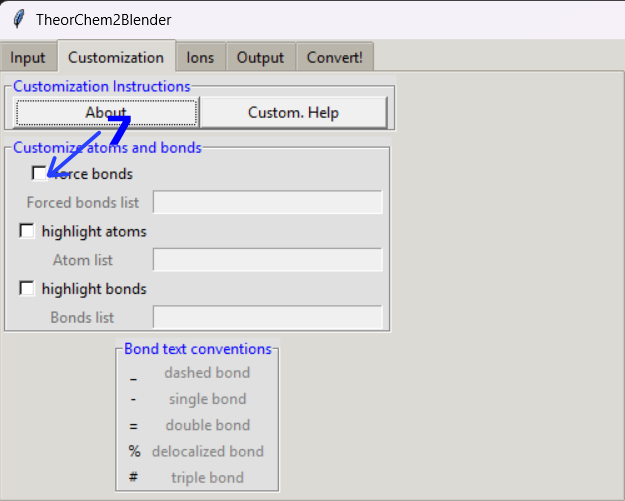
Customization tab
Because for this example, the bond length of the input is larger than a C-O bond, click on force bonds
Type the following on the Forced bonds list box: (If you type C01=O03 instead, the bond will be inverted) When forcing a bond, if the colors are inverted, try changing the order of the atoms as is this case.
C01=O02; O03=C01
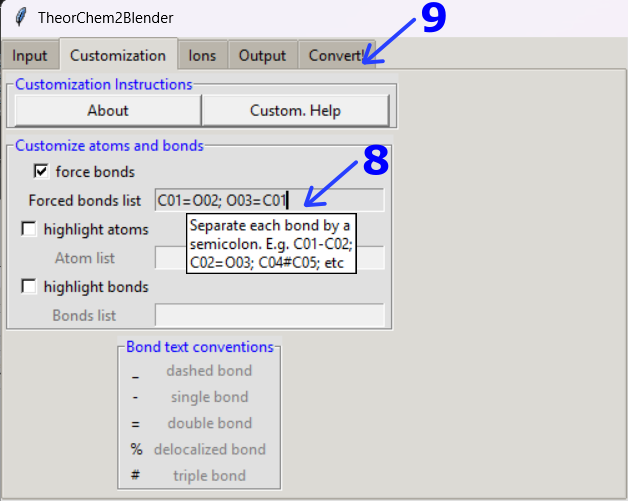
Click on the Output tab
Output tab
Select fbx as the output format
Click on the Convert! tab
Convert! tab
Convert the input
Your file will appear by default in the output/ folder.
Note
🎥 To see a video recording of this walkthrough, visit the following link: Watch on YouTube
🎥 To see a video recording of of another animation, customizing and highlighting bonds, visit this link: Watch on YouTube
Previous: (6) animating com files Next: (8) Unit cells, growth, Miller planes, and polyhedra